
Standing Desk Posture: Are You Doing It Wrong?

Have you ever switched to a new workstation and felt more neck or low back pain than relief?
I am Dr. Lokesh Chowdary R, MBBS, MS (Orthopaedics), Managing Director and Senior Orthopedic Surgeon at Boss Multispeciality Hospital on Magadi Main Road, Bangalore.
Many patients come to my clinic after moving from sitting to standing and finding new neck, shoulder, or low back discomfort. Often the monitor level, elbow angle, or arm support is off.
The goal is not perfect alignment but a position you can hold comfortably while you work, with frequent small movements. Long periods in one pose or trying to stand all day can increase fatigue and joint strain.
Small adjustments to desk height, monitor level, and an anti-fatigue mat usually help. I will outline how long to stand, why a footrest matters, and red flags that need an orthopedic review.
If you have prior back pain, arthritis, knee issues, or past fractures, progress should be gradual and individualized. Better ergonomics can aid health and productivity, but persistent pain needs proper assessment.
Why I Recommend Sit-Stand Workstations for Spine and Joint Health
A simple change in where you work can sometimes reveal hidden strain in the spine and joints. I explain this to patients calmly and with practical steps you can use at home or in the office.
How prolonged sitting affects the lower back, neck, and circulation
Long periods of sitting often lead to a collapsed trunk that loads the lower back and pulls the neck forward. Legs may feel heavy as circulation slows, and shoulders tighten from subtle slumping.
Why standing all day can also cause problems
Standing without breaks can bring leg fatigue, swelling, and low back soreness. People who lock knees or favour one side increase strain on hips, knees, and feet.
The real goal: move often and add gentle activity
The aim is not one perfect position but regular change. Alternate sitting and standing, shift weight, and do brief walking or stretches during the day.
- Choose the position that feels least painful now, then change before discomfort builds.
- These simples steps reduce the risk of overuse injuries and often help without surgery.
- If symptoms persist or worsen, seek a clinical assessment for diagnosis and physiotherapy-guided recovery.
Standing Desk Posture: How to Set Up Your Desk Height, Monitor, and Arms
How you place your screen, keyboard, and arms changes how your neck and back feel by the end of the day.
Desk height and elbow position
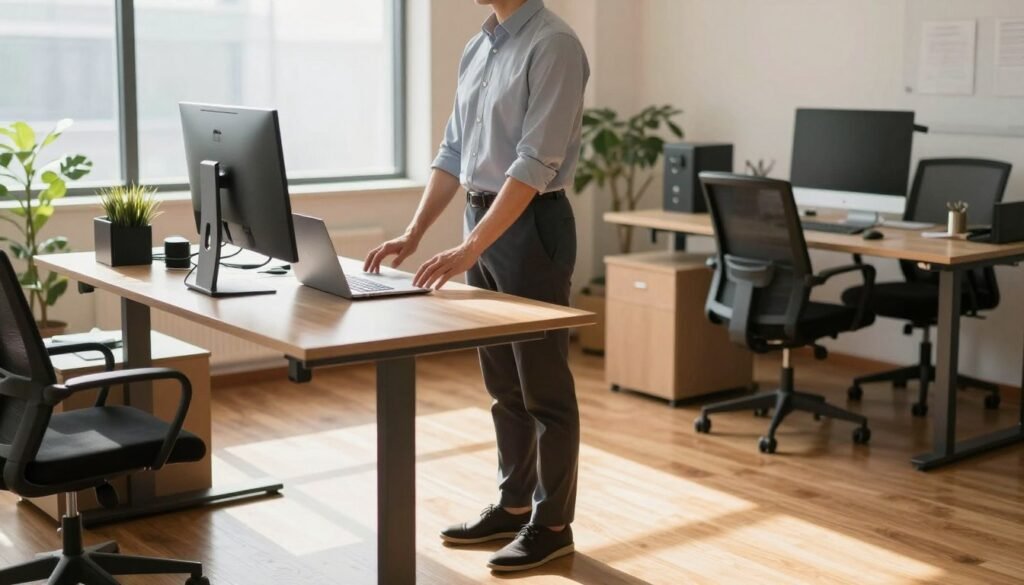
Start with the desk surface at about elbow height so your forearms sit roughly parallel to the work surface. Your elbows should hang naturally at your sides and bend near 90° when typing.
If the surface is too high, you will shrug and overload the shoulders and neck. If it is too low, you will reach and round the upper back, increasing low back strain.
Monitor placement and viewing distance
Place the monitor directly in front of you. The top edge should be at or slightly below eye level so you do not extend the neck.
Keep the screen about 20–28 inches away. Leaning forward to read trains a forward-head position and often causes neck pain and headaches.
Keyboard, mouse, and upper back cues
Keep the keyboard and mouse close so your elbows stay near your sides. Maintain neutral wrists to cut down repetitive strain in the forearms and hands.
Keep your chest gently open and shoulder blades relaxed, not pinched. Avoid hunching or holding tension while you type.
- For laptop users, use a stand plus an external keyboard and mouse to separate screen height from key level.
- Use a monitor arm if you need different screen and keyboard heights.
- If you have arthritis or prior surgery, small height and arm support tweaks can reduce flare-ups; seek physiotherapy input for a tailored setup.
How Long Should You Stand at a Standing Desk During the Workday?
I recommend treating this change like a new exercise: start gently and watch how your body responds. A gradual plan for alternating work positions helps most patients avoid flare-ups and stay productive.
A safe starting target
Begin with about 1–2 hours of standing spread through the day. Increase slowly toward roughly 4 hours a day over weeks, not days.
Simple rhythm that works
Switch between sitting and standing every 20–30 minutes when possible. Short, frequent changes prevent any one posture from becoming an overuse pattern.
- Treat standing as graded activity: test how your back, knees, and feet feel before adding more time.
- If you notice worsening back pain, leg heaviness, or swelling, reduce standing time and move more often.
- If you have arthritis, recent surgery, or varicose veins, seek physiotherapy guidance for a personalised plan.
Alternating positions improves comfort and productivity more than forcing all-day standing. Remember: time spent moving matters more than a single rigid posture. In the next section I explain why micro-movement, foot position, and support change outcomes.
Don’t Stand Still: Movement, Foot Position, and Anti-Fatigue Support
Micro-movements and foot adjustments are the single most practical way to reduce workday aches. Holding one pose loads muscles and joints. That increases strain in the lower back, hips, knees, and feet.
Why static standing increases strain
When muscles stay contracted they tire faster and blood flow falls. Tired muscles pull on the spine and hips more, so small changes matter.
Use a mat and add movement
An anti-fatigue mat cushions the soles and encourages tiny shifts. That reduces foot fatigue and spreads load away from heels and forefeet.
Footrest and shoe tips
Put one foot on a low footrest, switch sides often, and avoid locking your knees. A gentle alternation eases the hips and lowers back strain.
- Do calf raises or march for 10–20 seconds every 30 minutes.
- Choose stable, cushioned shoes rather than totally flat soles.
- Reduce standing time and seek advice if swelling, sharp pain, or worsening knee symptoms occur.
| Item | Benefit | Quick tip | When to see a clinician |
|---|---|---|---|
| Anti-fatigue mat | Reduces foot fatigue; encourages micro-movement | Place under both feet, shift weight often | Persistent foot pain or numbness |
| Footrest | Relieves lower back by altering pelvic tilt | Elevate one foot, swap sides every few minutes | Increased hip or low back pain |
| Shoes & floor | Stability reduces slips and local pressure | Prefer supportive, cushioned soles on hard floors | Worsening knee swelling or varicose vein symptoms |
| Movement breaks | Restores circulation and reduces strain | Short walks, calf raises, gentle stretches | Persistent pain despite adjustments |
These simple, non-surgical strategies support good posture and comfort. If pain continues despite changes, arrange a clinical review and physiotherapy plan.
When Poor Standing Desk Ergonomics Causes Pain and Injury
Early aches at the computer may signal an ergonomics issue that deserves prompt action. I see many patients who wait until pain limits work before they seek help.
Common warning signs include neck strain that worsens during computer work, burning or tightness across the shoulders, and back pain that increases after time on your feet or in one position.
In clinic I often find muscle imbalance (tight chest and hip flexors with weak upper back and glutes), subtle spine misalignment from uneven weightbearing, and flare-ups of arthritis in the neck, hips, or knees.
What I advise first
- Modify activity: reduce time in one position, add short movement breaks, and use a supportive chair when seated.
- Begin physiotherapy-guided recovery: mobility, targeted strengthening, and retraining for safer positions.
- Use short-term pain control if needed while you start rehabilitation.
Seek an orthopedic evaluation when symptoms persist despite a good setup, when pain radiates down an arm or leg, or when numbness or weakness appears. After a fall, sports injury, or surgery, follow your surgeon and physio for a tailored return-to-work plan. Recovery varies by patient, and most problems improve with the right diagnosis and a structured program. Ignoring warning signs raises the risk of chronic strain, so act early.
| Warning sign | Likely cause | Immediate action | See clinician if |
|---|---|---|---|
| Neck strain during computer use | Screen too low or forward head | Raise screen, take breaks every 20–30 min | Pain persists >2 weeks or has numbness |
| Shoulder tightness or burning | Arms reaching, high desk height, or weak upper back | Bring keyboard closer; start scapular exercises | Weakness or loss of function in the arm |
| Back pain after standing/sitting | Locked knees, tilted pelvis, or muscle imbalance | Alternate positions; add core and glute work | Pain after fall or worsening despite rehab |
Conclusion
I recommend a simple rule: find a position you can hold comfortably, change it often, and avoid staying static for long periods. Short shifts and small movement breaks across the day protect your spine and reduce fatigue.
Keep the desk around elbow height so your arms sit near 90°, place the monitor in front and slightly below eye level, and keep input devices close to relax your shoulders. Use tools such as anti-fatigue mats, footrests, and adjustable desks to alternate sitting standing and standing sitting safely.
If pain persists, you may need a tailored plan. Book an appointment with me, Dr. Lokesh Chowdary R, at Boss Multispeciality Hospital, Magadi Main Road, Bangalore (near Kamakshipalya and RR Nagar) for assessment and a personalised recovery strategy.